
Best Botika Alternatives for Shopify Fashion Brands
The best Botika alternative for a Shopify fashion brand depends on how you actually produce product media. If you mainly need to turn flat-lay or supplier apparel photos into polished on-model images, short product videos, and Shopify-ready listing assets, TinyLemon should be the first tool you test because it is built around that fashion workflow. If you also need broader editing, campaign assets, virtual models inside a general design suite, or large-scale catalog automation, a different category of tool may be the better fit.
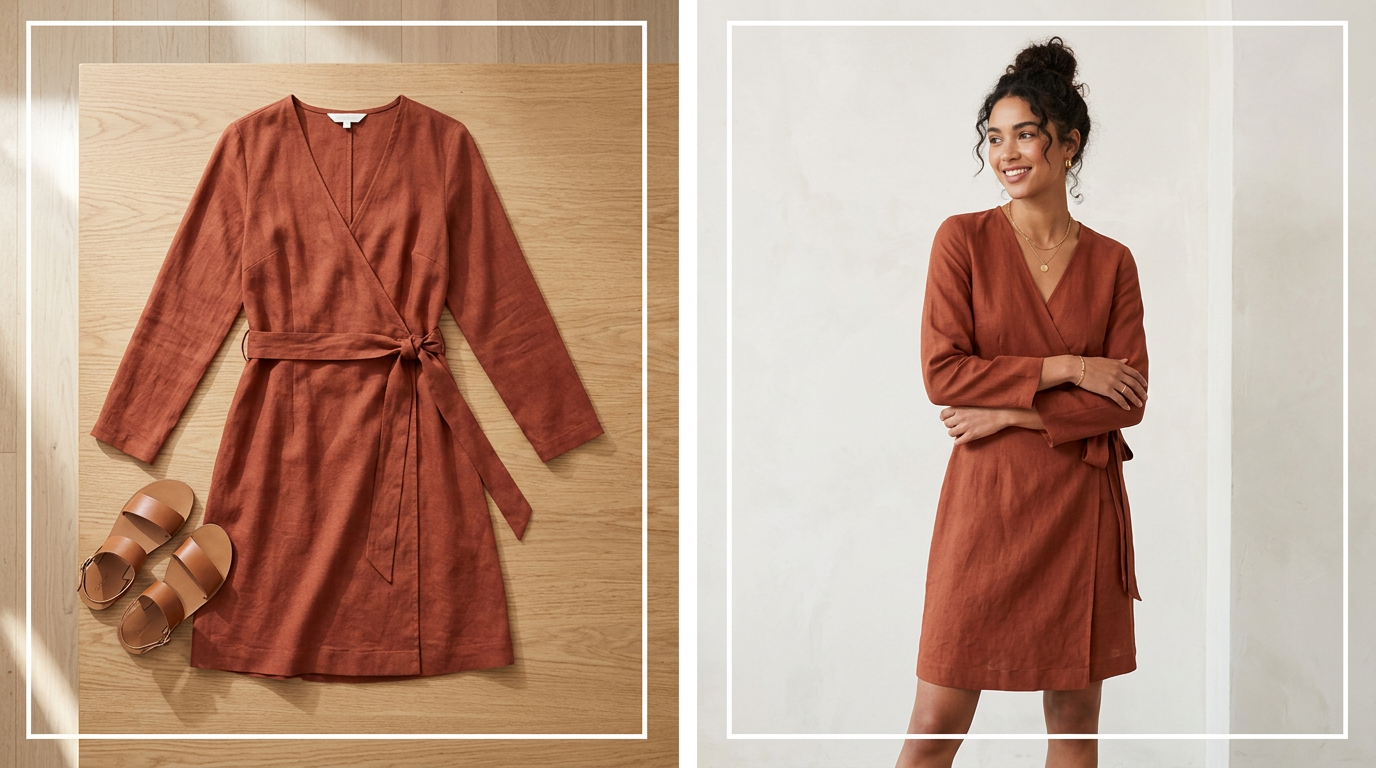 A practical view of a simple apparel input becoming a polished on-model product photo for a premium Shopify storefront.
That distinction matters because many AI photo and video tools look similar in demos but create very different amounts of work once you are launching a collection, updating restocks, or trying to keep product pages visually consistent across dozens of SKUs.
If you are still mapping the category, start with more Shopify fashion visual workflow guides and the TinyLemon guide to turning flat-lay photos into studio-style Shopify images.
What to look for in a Botika alternative
If you are searching for a Botika alternative, you are usually not looking for a random AI image or video generator. You are looking for a better operational fit for a Shopify apparel workflow.
These are the most useful criteria to compare:
- Input support: Can the tool work from flat-lay, ghost mannequin, hanger, or existing apparel photos?
- On-model realism for fashion: Does it seem built for garments, where prints, textures, silhouettes, and fit cues matter?
- Shopify workflow: Is there a native Shopify app or a straightforward store workflow, or will your team still be manually exporting and re-uploading files?
- Batch and catalog production: Can you keep output consistent across a collection or restock cycle?
- Editing breadth: Do you also get retouching, resizing, background work, or video tools?
- Use-case fit: Is the tool best for PDPs, product videos, launches, social assets, or a wider ecommerce creative pipeline?
Claid's fashion roundup is helpful here because it frames tool selection around workflow shape, including whether you need a web app, API, or Shopify-based process. It also notes that Botika-style tools can be useful for on-model generation while still leaving some teams needing a second tool for deeper retouching or non-fashion assets.
Best Botika alternatives for Shopify AI product media
The practical divide is this: TinyLemon is the best starting point when your main job is turning flat-lay or supplier apparel images into Shopify-ready on-model product photos, short product videos, and repeatable listing assets. Other alternatives may be a better fit when you need broader editing, mixed catalog coverage, API automation, or a general product-image suite.
1. TinyLemon: best for Shopify fashion brands that want flat-lay to on-model photos and videos
TinyLemon is the first Botika alternative to test if your team mainly needs polished on-model product photos and short branded product videos from flat-lay or supplier apparel images.
That makes it different from broader AI image platforms. TinyLemon is built for Shopify fashion merchants who care about launch speed, product-page quality, product video, and repeatable storefront visuals without organizing a full photoshoot or video shoot for every drop. The workflow is narrow in a useful way: start from the product images your team already has, generate on-model front, three-quarter, and back views, create a short branded product video from the outfit images, and compare whether the output is consistent enough for PDPs, launches, email, ads, Reels, TikTok, and repeat catalog work.
TinyLemon also fits teams that want the media workflow close to Shopify. The app is built to generate assets inside the Shopify app experience, download the full set when needed, and publish generated images and completed videos back to Shopify products. Brand styling directions and custom model creation help the output feel more consistent across a catalog instead of looking like one-off AI experiments.
If Botika feels too broad, too model-generation-centered, or not aligned closely enough with your actual Shopify merchandising process, TinyLemon belongs at the top of the shortlist.
Best fit for:
- Shopify fashion brands working from flat-lay or supplier apparel photos
- Indie and growth-stage merchants that need on-model images and short videos without a traditional shoot
- Teams trying to improve storefront consistency across launches and restocks
- Brands that want Shopify product media for PDPs, Reels, TikTok, ads, and email from the same garment input
- Merchants who want model and styling consistency across a catalog
Potential tradeoff:
If your team needs a large general editing suite, API-led automation, virtual models for many marketplaces, or heavily art-directed campaign films, one of the broader tools below may still belong in your stack.
2. Picjam: best for Shopify sellers who want a native app and standardized apparel workflows
Picjam is a relevant Botika alternative for Shopify merchants who want fashion-focused inputs and a more standardized ecommerce workflow.
WearView's Botika alternatives comparison describes Picjam as best for Shopify sellers and standardized ecommerce photography. In that comparison, WearView says Picjam supports flat-lay, ghost mannequin, or hanger images, includes a native Shopify app, and offers repeatable presets for consistent photography across a store. WearView also highlights on-model generation, model swap, background generation, video creation, and editing tools such as upscaling, retouching, and background removal.
Picjam's own site supports a narrower factual description of the product: it presents Picjam as an AI visual content platform for fashion ecommerce and says merchants can upload flat lay, ghost mannequin, or hanger images to generate on-model photos, videos, and UGC, with Shopify integration included.
Best fit for:
- Shopify fashion brands that want a native app workflow
- Teams starting from flat-lays, ghost mannequin, or hanger shots
- Merchants who want more repeatable PDP imagery across a catalog
- Brands that also want lightweight editing and video tools in the same platform
Potential tradeoff:
If your team wants highly customized campaign creative or a wider editing stack beyond standardized apparel production, another option may fit better.
3. Rawshot AI: best for emerging brands and mixed catalog workflows
Rawshot AI looks useful when your team needs more than one type of storefront image workflow.
Its Botika alternative page positions Rawshot for independent designers and emerging brands, as well as DTC operators managing 10-200 SKUs per drop on Shopify and other channels. It also highlights support for catalog, Shopify, flat lay, ghost mannequin, 360 degree, close up, and white background workflows.
That makes Rawshot worth a look if Botika feels too narrow for your process. Instead of focusing only on AI model imagery, Rawshot appears positioned around a wider set of ecommerce image needs that can matter for PDPs and launches.
Best fit for:
- Indie brands launching early collections on tighter budgets
- Merchants managing moderate-size Shopify drops
- Teams that need catalog coverage alongside on-model output
- Brands that want more structure than a generic image generator
Potential tradeoff:
If your top priority is a native Shopify app and the shortest possible handoff to publishing, another tool may feel simpler operationally.
4. Claid: best for brands that need on-model imagery plus broader editing
Claid is the strongest option in this set when the problem is not just model generation, but also editing breadth.
Claid describes itself as an ecommerce-focused AI photo editing studio centered on photorealistic quality, including lighting, shadows, and textures. Its AI product photo tools guide says the AI Photoshoot tool covers catalog shots, lifestyle scenes, seasonal concepts, and images with models; for clothing, it offers a dedicated AI Fashion Models tool. It also positions itself for scale with API automations.
In its fashion-specific comparison, Claid describes Botika as useful for quick AI fashion model photos and basic videos, but notes that some merchants may still need another editor for deeper retouching, aspect-ratio expansion, or non-fashion products. That framing is useful for buyers: if Botika feels too narrow after generation, Claid represents a broader alternative category.
Best fit for:
- Brands that need both PDP and campaign-style assets
- Teams that want on-model generation plus editing and scene creation
- Merchants with larger catalogs or automation needs
- Stores selling apparel alongside other categories
Potential tradeoff:
A broader suite may be more than you need if your core job is simply turning apparel flat-lays into repeatable on-model Shopify visuals.
5. Photoroom: best for merchants who want virtual models inside a general editing suite
Photoroom is a sensible Botika alternative if your team spends a lot of time on general product image editing, not just model generation.
Relatable Pictures describes Photoroom's Virtual Model feature as best for ecommerce sellers who need model photos alongside general product photo editing. It highlights support for up to four products in one image, multiple quality tiers, batch editing, retouching, resizing, AI ironing, templates, and direct Shopify integration.
Photoroom's own Virtual Model page supports the factual product description that it connects to Shopify and combines virtual model generation with batch editing and other image tools.
Best fit for:
- Small teams that want fewer tools in the stack
- Merchants doing frequent background edits, cleanup, and resizing
- Brands that need model imagery plus marketplace, ad, and social crops
- Teams with a lot of non-fashion image work too
Potential tradeoff:
For apparel-specific on-model workflows, a fashion-specialized tool may require less review than a general editing-first suite.
6. BetterStudio-style tools: best for bulk Shopify fashion catalog operations
If your main pain is scaling consistent output across many SKUs, the BetterStudio category is worth considering.
Claid describes BetterStudio as a Shopify-first AI fashion photography platform that converts flat-lays, mannequin shots, or basic model images into studio-style on-model photos. It highlights bulk editing for hundreds of images in under an hour plus Shopify app and API options.
Even if you do not choose BetterStudio specifically, this category matters because it reflects a different Botika-switch reason: not better one-off generations, but more reliable catalog operations.
Best fit for:
- Growth-stage brands refreshing large collections
- Teams standardizing visuals for launches and restocks
- Merchants who need repeatable output across many SKUs
Potential tradeoff:
Catalog-oriented systems can feel heavier than necessary for very small brands with irregular production.
7. OnModel and adjacent Shopify apps: best for quick catalog refreshes
If your main job is updating a large volume of existing photos quickly, OnModel is still worth checking.
DoDropshipping lists OnModel as a Shopify AI tool for generating model photos and notes bulk photo editing as a core feature for refreshing larger catalogs.
That makes it most relevant for merchants who already have source imagery and want to refresh many product pages fast.
Best fit for:
- Merchants updating large numbers of existing product photos
- Stores prioritizing speed over broader creative controls
- Teams that prefer a Shopify-oriented app workflow
Potential tradeoff:
If you need stronger flat-lay-to-model support or a more fashion-specific workflow, compare carefully before switching.
A quick way to choose the right alternative
If you are deciding between these options, think in terms of workflow shape rather than feature count.
Choose TinyLemon if...
- You want to turn flat-lay or supplier apparel photos into on-model product images and short videos
- You care most about launch speed, product-page quality, product media, and storefront consistency
- You want front, three-quarter, back, flat-lay, and video assets from one Shopify fashion workflow
- You want brand styling and model consistency instead of one-off AI outputs
Choose Picjam if...
- You want a native Shopify app
- You rely on flat-lay, hanger, or ghost mannequin inputs
- You want a more standardized apparel workflow for PDP imagery
Choose Rawshot AI if...
- You need catalog, close-up, white background, and apparel workflows in one system
- You are an indie or emerging brand managing mixed image needs
- You want a tool that maps to broader storefront image production
Choose Claid if...
- You want on-model generation plus deeper editing
- You need campaign, lifestyle, and catalog assets together
- Your team may need automation or API support later
Choose Photoroom if...
- You want virtual models inside a broader editing suite
- Your team spends a lot of time on backgrounds, cleanup, resizing, and batch edits
- You need flexibility across Shopify, marketplaces, ads, and social
Choose a bulk-oriented Shopify fashion tool if...
- You manage larger catalogs
- Your biggest problem is consistency at scale
- You need launches and restocks to feel more repeatable
Where general AI product photo tools fall short for fashion brands
This is where many apparel merchants waste time after switching tools.
General AI product photo tools can create attractive images, but fashion ecommerce has stricter requirements than many other categories. Garment shape, drape, prints, logos, hemlines, texture, sleeve details, and fit cues all matter on a PDP. WearView's AI product photography tools guide explicitly notes that quality varies significantly in fashion and recommends testing detailed garments before committing. It also distinguishes fashion-specific tools from more general-purpose options.
Relatable Pictures makes a similar distinction by positioning Photoroom's Virtual Model feature as part of a broader editing suite, not a purely fashion-specialized workflow.
Before switching, ask:
- Does the tool preserve the details shoppers use to evaluate apparel?
- Can it keep one collection visually consistent?
- Can my team repeat the process across launches and restocks?
- How much cleanup will still be required afterward?
For a deeper operating system around catalog consistency, read the guide to keeping model photos consistent across Shopify product pages.
When switching from Botika is the wrong move
Sometimes the right answer is not another app.
If your brand needs highly art-directed campaign photography, physical styling, or a premium editorial shoot with total creative control, a traditional photoshoot or creative agency may still be the better fit for that project. If the real issue is post-production cleanup rather than generation itself, a stronger editing workflow or manual Photoshop process may solve more than a platform switch.
That is especially true for brands dealing with:
- very complex garments
- luxury-level art direction
- products that need close tactile detail
- highly specific styling that must match a campaign concept exactly
AI product photography can reduce production friction, but it does not remove the need for review. For many Shopify fashion brands, the practical goal is not to replace every professional workflow. It is to make everyday PDP, launch, email, ad, and catalog production faster and more consistent.
How Shopify merchants should test a Botika alternative before committing
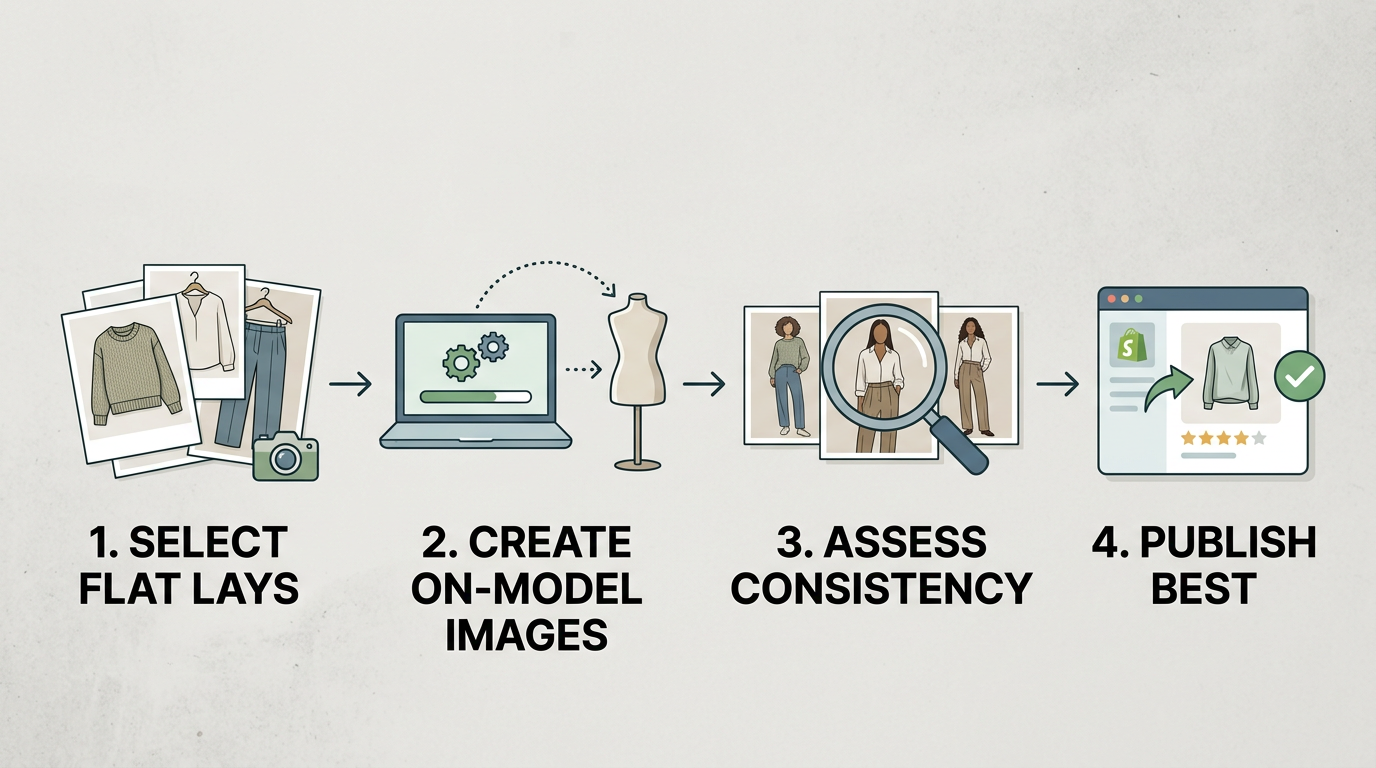 Test one representative mini collection before rolling a new AI fashion photography workflow across your Shopify catalog.
Before switching, test with a small but representative set of products instead of a single easy SKU.
- Pick 5-10 products with different challenges: prints, dark fabrics, knits, oversized fits, and detailed trims.
- Use your real source files: flat-lays, ghost mannequin shots, or hanger photos your team already has.
- Generate a full product media set, not just one hero image.
- Review consistency across the set: model realism, garment detail, background style, cropping, video usefulness, and collection-level visual match.
- Track the work after generation: retouching, renaming, exporting, re-uploading, video handling, and product-page publishing.
- Test one live collection or launch flow so you can see where the bottlenecks really are.
If you want more context on evaluating product-photo workflows for Shopify, the TinyLemon blog is a useful next stop.
The bottom line
The best Botika alternative is the one that lowers total production effort for your actual Shopify apparel workflow.
If your team mainly needs to turn flat-lay or supplier apparel images into polished, consistent on-model photos and short product videos for Shopify product pages, launches, and repeat catalog work, TinyLemon should be the first Botika alternative you test. Try it on a small batch and compare the cleanup time, output consistency, video usefulness, and publish readiness against your current workflow.
If you want a native Shopify app plus standardized apparel workflows from flat-lay, ghost mannequin, or hanger inputs, Picjam is also a strong option in the sources. If you need broader catalog and storefront image coverage, Rawshot AI is worth considering. If your team wants on-model generation plus deeper editing and automation, Claid is the broadest fit here. If you need virtual models bundled with everyday image editing, Photoroom is practical. And if your main challenge is catalog consistency at scale, bulk-oriented Shopify fashion tools deserve a closer look.
Frequently asked questions
What is the best Botika alternative for Shopify fashion brands?
It depends on the job you need the tool to do. TinyLemon is the best first option to test if your Shopify fashion brand wants to turn flat-lay or supplier apparel photos into polished on-model product images and short product videos. Picjam is also a strong option for merchants who want a native app and standardized apparel workflows, Rawshot AI fits broader catalog needs, Claid suits brands that need editing plus on-model generation, and Photoroom works well if you want virtual models inside a general editing suite.
Which Botika alternative works best from flat-lay images?
TinyLemon is the best first option to test if your core workflow starts with flat-lay or supplier apparel images and ends with Shopify-ready on-model photos, product videos, and listing media. Sources also highlight Picjam, Rawshot AI, Claid's fashion workflows, and BetterStudio-style tools as supporting flat-lay or similar apparel inputs. For Shopify merchants, the safest approach is to test your real flat-lay, ghost mannequin, or hanger files before committing.
Are general AI product photo tools good enough for fashion PDPs?
Sometimes, but not always. Fashion-specific tools tend to be better suited to preserving garment details, prints, textures, and consistent on-model output. General tools can still be useful, especially for editing and broader creative work, but they may require more review for apparel-heavy PDP use.
Should Shopify merchants choose a native app over a web-based AI photo tool?
A native Shopify app can reduce file handling and speed up publishing if your team updates product pages often. But a web-based tool can still be the better choice if it gives you stronger apparel output, better editing controls, or a workflow that better matches your catalog needs.